
In one of my previous posts I installed badstore.net on my XenServer. This was not that easy, i solved all problems, however the results had not been so very good. There are 2 reasons for this:
- Badshop uses a java script to forward users to http://www.badshop.net/cgi-bin/badstore.cgi. So it will forward all your requests to an external website, even if you host it on your own environment.
- some of the hyperlinks on the web page are no relative links but link to http://www.badstore.net/something.cgi
- some of these hyperlinks forward to an ssl- url.
As I had to fix this using my NetScaler as badstore boots from a CD image.
So let’s start with number 1:
Ok. We have rewriting policies on a NetScaler, and we may use NetScaler rewriting policies to change content on a website. Unfortunately I could not really understand edocs about search and replace on websites. There are some blog articles about customizing NetScaler logon page, however they also had been of hardly any use to me. In the end I found a page describing rewriting for NetScaler 8.x, but I use NetScaler 10.5. The page was not completely right and very outdated, but it helped me finding my way.
The NetScaler rewrite action:
add rewrite action rw_act_badstore_net2local replace_all
"HTTP.RES.BODY(22528)" "\"badstore.mydomain.local\"" -pattern
www.badstore.net
This is what it would look like if I’d rather used the GUI of 10.5:
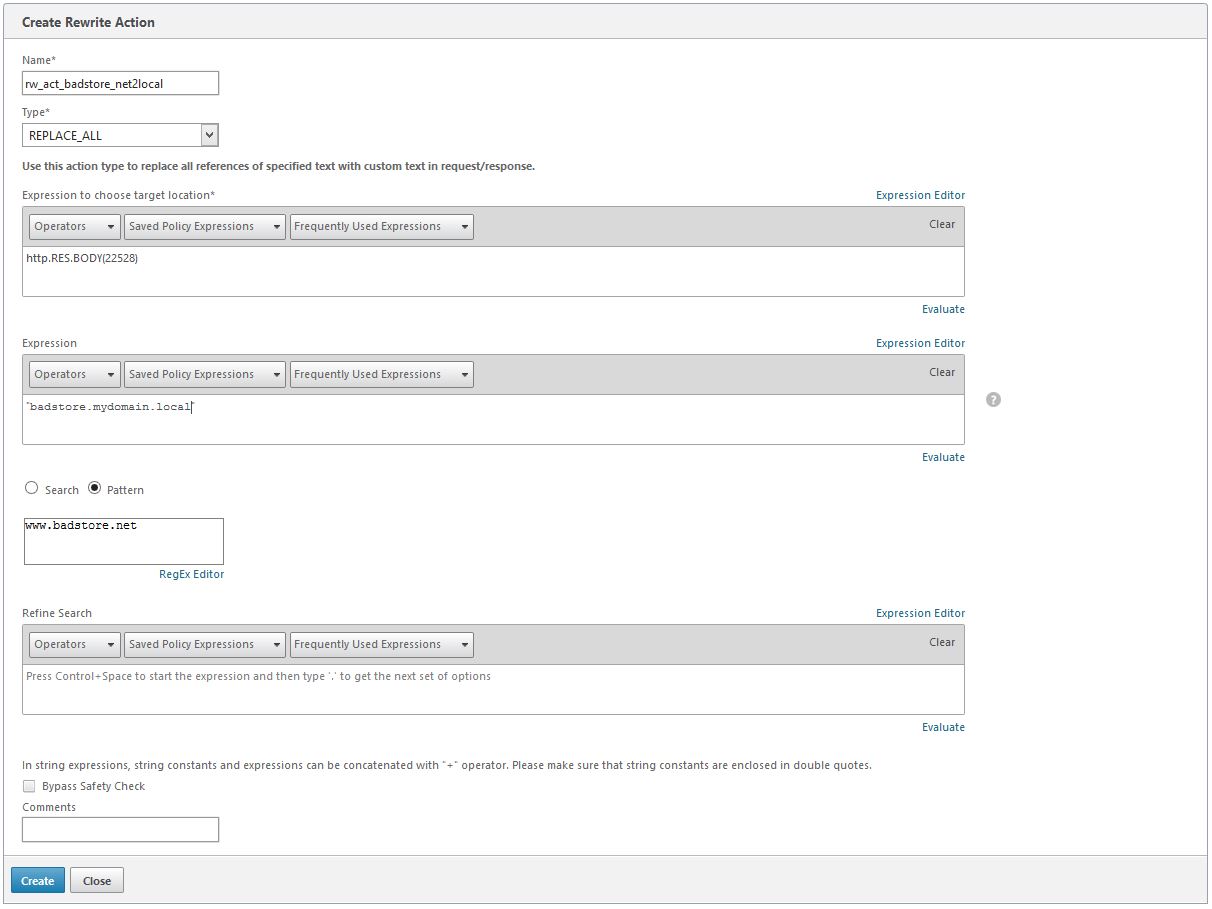
so what does this mean?
- The type of rewrite action is replace_all. We want to replace all http://www.badstore.net with our internal url badstore.mydomain.local!
- Where do we replace? In the first 22528 byte of the server response’s http response (but no header fields): http.res.body(22528)
The number should be as small as any possible if you host big pages to avoid unnecessary load on our NetScaler. I did not give it a try: this is just 22 kBt, so a near to unlimited size *lol*
Following Curtis’s suggestion:HTTP.RES.BODY(HTTP.RES.CONTENT_LENGTH)would be all of the body, dynamically adapted. - which text should get replaced?
www.badstore.net. That’s the pattern we’re searching for! - which text should be there instead?
badstore.mydomain.local
To be understood by the processing engine this string has to be in quotes, however the string itself has to be quoted too. So we add quotes, but we need to add a second set of quotes.""badstore.intern.mydomain.local""would not do the trick as""would be both, the beginning and the end of quotes. So we have to mask the 2nd set. That’s what\"does. Did you understand? I’m so sorry. No matter if you understand or not: use it the way I did, it worked for me and it will work for you too!
The NetScaler rewrite policy
add rewrite policy rw_pol_badstore_net2local true rw_act_badstore_net2local
This adds a NetScaler rewriting policy. The filter is true, so all responses get rewritten. Be careful on this as it may be a waste of ressources! The policy action is the rw_act_badstore_net2local action described above.
bind lb vserver badstore.mydomain.local -policyName
rw_pol_badstore_net2local -priority 100 -gotoPriorityExpression NEXT
-type RESPONSE
- This will bind this very policy (rw_pol_badstore_net2local) to my vserver badstore.mydomain.local. Never bind a policy like that globally as it will process all responses of all servers. This may lead to unwanted behaviour, i.e. this blog would not work as the blog is hosted behind this very NetScaler! It is also a waste of resources as the string has not to be exchanged on any other website hosted behind this NetScaler!
- The priority of this Policy will be 100, and we will also process the next policy. This was nescesary as we will have to fix this https problem (problem number 3).
- And last, not least: This is a response policy. It will never affect requests.
What did this do?
It solved problem 1 and also problem 2!
All hyperlinks, but also our java script now points to badstore.mydomain.local. Even the SSL hyperlink mentioned in problem 3 points to the right domain!
NetScalers are rather cool, don’t you think?
Problem number 3
You may have guessed: there is no more problem about that. We create a 2nd replace policy and replace https with http. I don’t screen shot this policy as it is very similar to the first one, however I add the command here.
add rewrite action rw_act_badstore_https2http replace_all "http.RES.BODY(22048)" "\"http://\"" -pattern "https://"
 ADC Citrix Netscaler